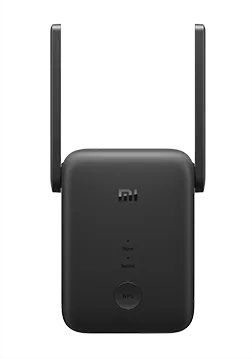
Xiaomi Range Extender RA75/Xiaomi Range Extender RC04
Specifications§
- Processor
- MediaTek MT7628DAN, MIPS, 580 MHz
- Flash memory
- 16 MB SPI
- RAM
- 64 MB
- Ethernet
- 4 × 100M WAN
- USB
- none
- Wi-Fi chip
- MediaTek MT7628DAN, MediaTek MT7612EN/MT7613BE
- Wi-Fi 2.4 GHz
- N, 40MHz, 2x2, 300MB/s, 64QAM
- Wi-Fi 5 GHz
- AC, 80MHz, 2x2, 867MB/s, 256QAM
Build features§
- FunctionalityExcept:
Cloud services
WPS - Factory resetWith the Reset button
- LEDsYes
- Mesh compatibilityWith original devices and clones
- Built-in storageEntware cannot be installed
- ComponentsEverything for a router without USB
Preparing for flashing§
- Download and unpack the firmware archive The “Download” button is in the panel under the device name.
- Prepare a UART adapter or a programmer On this model the installation is possible only with the device disassembled.
Installing from stock firmware§
Warning
Installation is possible only via UART or a programmer. On this model you cannot switch to third-party firmware without disassembly.
-
Extracting the EEPROM Back up the flash memory with a programmer and extract the EEPROM with the “Extract EEPROM” tool. Or replace the bootloader with Breed via UART and save the EEPROM from there.
-
Preparing the EEPROM First move the calibration, then set the MAC address in the resulting file. The result is your EEPROM.
-
Flashing In the second item of the second tab, choose the
RC04/RA75_4.2.6_FULL.binfirmware, clear the last 2 checkboxes and confirm the upload.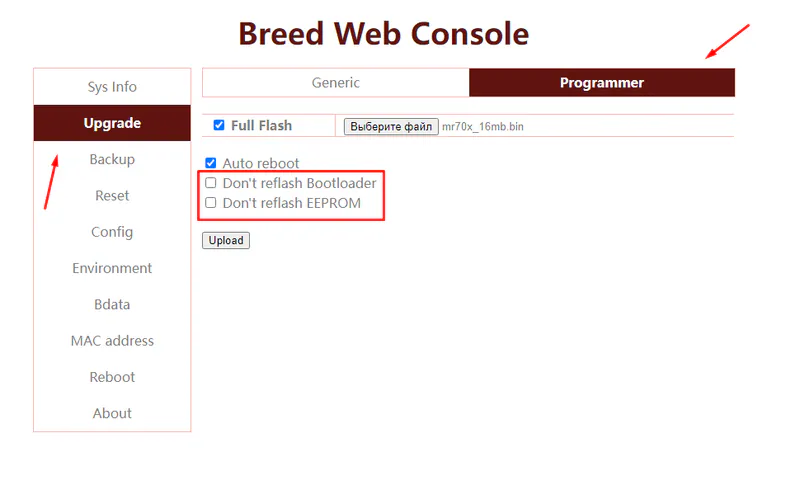
-
Restoring the EEPROM After the installation, enter Breed again by holding Reset and restore the EEPROM from step 2.
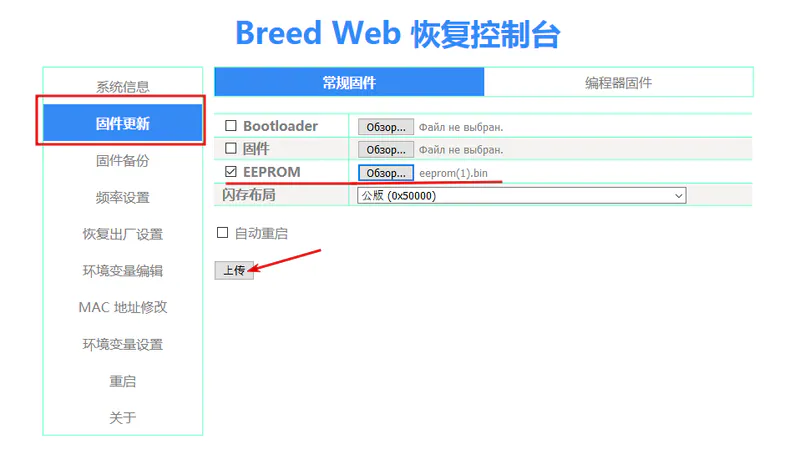
After the reboot the device starts.
Done!
Router access
- Web interface
- 192.168.1.1
- Wi-Fi password
12345678
Updating the firmware§
To update, use the method for SPI memory.
Reverting to stock firmware§
On this model both the installation and the revert are done via UART or a programmer: write the full flash memory backup created in the first installation step with the programmer.